Coupons are promotional codes that provide either discounts or free credits when applied to your account. These codes can be part of a marketing campaign, a referral program, or onboarding offers.
Discount Coupons
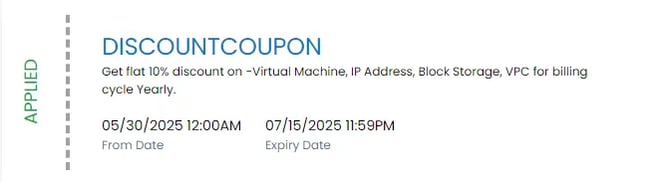
Discount coupons apply a percentage-based discount to specific services. For example, a coupon might give you 20% off for buying a yearly virtual machine subscription.
Free Credit Coupons
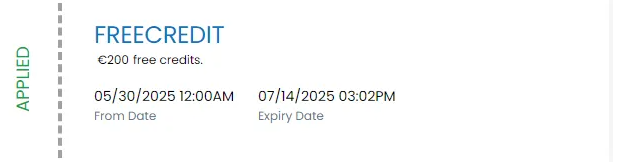
Free credit coupons give you a fixed monetary value (e.g., €100) in promotional credit to use across eligible services on the platform.
Free credits allow you to explore the platform without an initial payment, and are automatically used to cover eligible service usage until they expire or are fully consumed.
Redeem Coupons
Discounts or free credits are available via a special coupon code. If you have received a code (e.g., from a promotional offer or as part of your account setup), you can redeem it to receive your discount or free credits.
Enter the Coupon Code in the Portal
- Navigate to the sidebar on the left side of your screen and select the Billing option. Go to the Coupons section.
- Enter your coupon code in the provided field and click the "REDEEM COUPON" button.
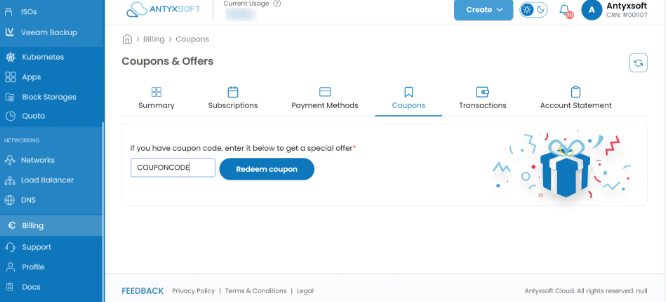
- Once the coupon code is redeemed, either the discount or the free credits will appear in your account balance and can be applied.
Usage of Credits
Free credits can be used to pay for various cloud services, including compute resources, storage, data transfer, and more, as long as your credits are still available.
Credit Value
The value of the free credits will be displayed once the coupon code is applied. Keep in mind that different coupon codes may provide different amounts of free credits.
Expiration
Credits are typically valid for 45 days after they are applied to your account. Make sure to use them before the expiration date, as unused credits will expire.
Discount Coupons Explained
Eligible Services
Discount coupons apply to specific services such as Virtual Machines or Block Storage. The eligible services will be outlined in the coupon terms.
Each coupon provides a predefined discount — for example, 10% off Virtual Machines. The rate and applicable services will be shown when the code is applied.
Discounts apply for a limited time (e.g., 1 month, 45 Days). The expiration details are defined in the coupon’s terms.
- Navigate to the sidebar on the left side of your screen and select the Billing option. You will be redirected to the Billing page.
- Click on the “Account Statement” tab.
- Select the “Free Credits” tab.
A list of all your free credits will appear, showing you the total amount of the free credits, the amount of the available credits and the expiration date of them.
How to pay an invoice with free credits
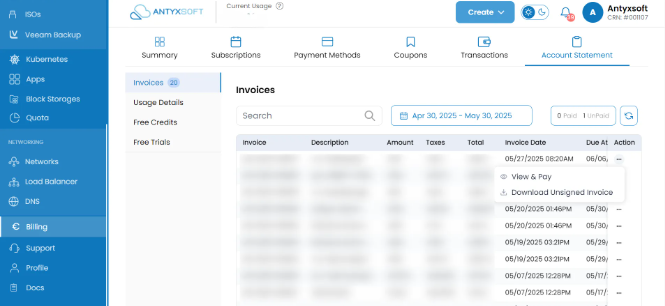
- Log in to your Antyxsoft account.
- Navigate to 'Billing' from the left menu.
- Select the 'Account statement' tab.
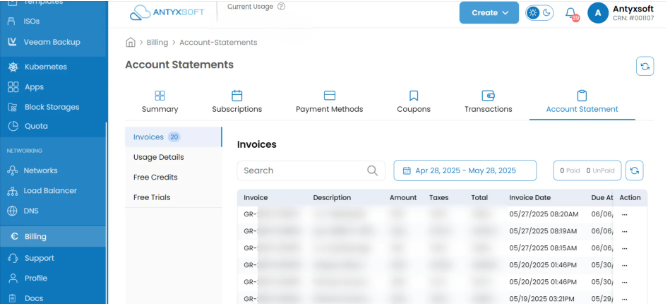
- For the invoice you would like to pay, select the 3 dots in the column ‘Actions’.
- Select ‘View & Pay’
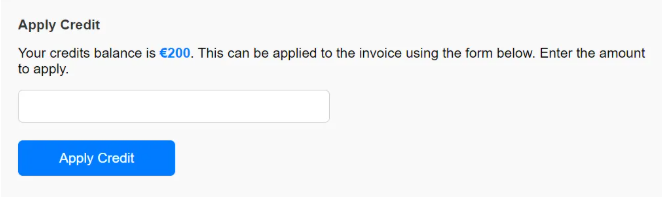
- Then insert the invoice amount to the field Apply Credit and click to ‘Apply Credits’ button.
- Non-Transferable: Free credits are tied to the account that applied the coupon code and cannot be transferred to another account.
- Non-Refundable: Any unused credits will expire and cannot be refunded or exchanged for cash.
- Eligibility: Free credits may only be available to specific customers or users based on region, account type, or promotion.
What happens if I don't use all of my free credits before they expire?
Any unused credits will automatically expire on the expiration date, and they cannot be extended or refunded.
Can I use my free credits on all services?
Free credits are generally applicable to most cloud services, but certain exceptions may apply. Be sure to check the terms and conditions for specific details.
What types of coupons do you offer?
We offer two types of coupons:
- Free Credit Coupons that add a fixed amount of promotional credit to your account.
- Discount Coupons that apply a percentage-based discount to specific services for a limited time.
How can I apply a coupon code to my account?
You can apply a coupon by logging into your account, navigating to Billing → Coupons, entering your code, and clicking REDEEM COUPON. If the code is valid, the credit or discount will be applied immediately.
Yes, coupons expire.
- Free credits typically expire 45 days after activation.
- Discount coupons may expire after a set number of days or after reaching a usage limit.
Always check the terms that came with your coupon.
No. Coupons are non-transferable and can only be used on the account they were originally issued to.
Double-check that:
- The code was entered correctly
- The coupon hasn’t already been used or expired
- The coupon applies to your account type (e.g. Client, Partner) If the issue persists, contact our support team for assistance.