What is Elasticsearch
Elasticsearch is an open source, distributed search and analytics engine built for speed, scale, and AI applications. As a retrieval platform, it stores structured, unstructured, and vector data in real time — delivering fast hybrid and vector search, powering observability and security analytics, and enabling AI-driven applications with high performance, accuracy, and relevance.
Key features of Elasticsearch include:
- Scalability: Built on a distributed architecture that allows horizontal scaling by adding nodes to a cluster, enabling it to handle large volumes of data efficiently.
- Search capability: Provides powerful full-text search with relevance scoring, fuzzy matching, and advanced query options for fast and accurate results.
- Near real-time performance: Data becomes searchable within seconds of indexing, making it suitable for log analytics, monitoring, and real-time applications.
- Data model: Uses a document-oriented approach with JSON-based documents, offering flexibility and schema-free data storage.
- Analytics: Supports advanced aggregations and analytics functions for summarizing, filtering, and analyzing large datasets.
- High availability: Ensures data redundancy through replication and automatic failover to maintain system reliability.
- API-driven: Exposes RESTful APIs for easy integration with applications, automation tools, and external systems.
- Security: Provides features such as authentication, role-based access control, encryption, and auditing (depending on configuration and licensing).
- Ecosystem integration: Works seamlessly with the Elastic Stack (Kibana, Logstash, Beats) for visualization, data ingestion, and observability use cases.
This guide describes how to deploy an Elasticsearch instance from the Antyxsoft Cloud Portal.
Getting started with Elasticsearch Deployment
Log in to portal.antyxsoft.io and during the instance creation at the Select Template section click on the MarketPlace App tab.
Select the ready-to-go Elasticsearch template from the list of available templates and deploy it.
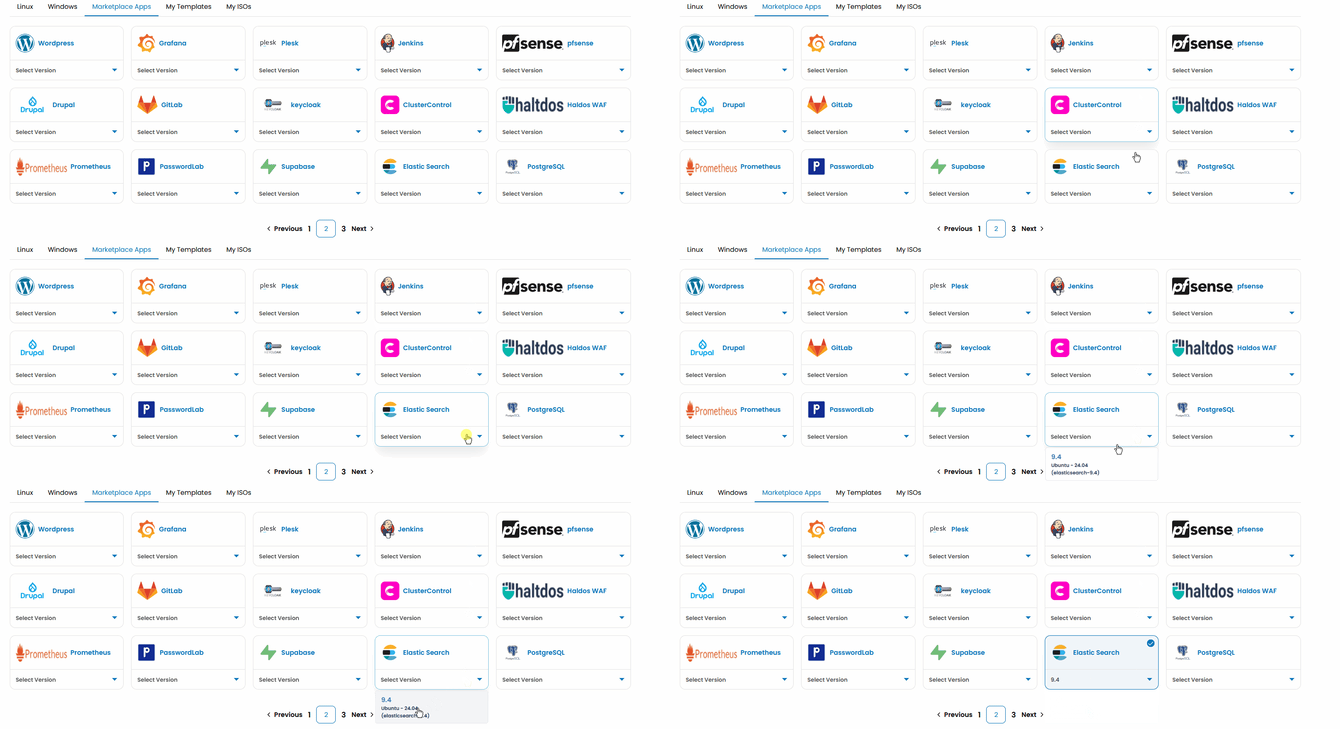
Once you select your plan resources and named the VM. Click on the Review & Deploy button to deploy your new app.
After template is deployed, you can access your Elasticsearch instance with SSH
Once logged in with SSH you need to setup your elastic user password.
On the SSH terminal run command:
/usr/share/elasticsearch/bin/elasticsearch-reset-password -u elastic --url https://127.0.0.1:9200
to manually provision a new elastic user password.
To auto-generate an elastic userpassword run command:
/usr/share/elasticsearch/bin/elasticsearch-reset-password -u elastic -a --url https://127.0.0.1:9200
Once the elastic user password is provisioned you can access Elasticsearch REST API on https://ELASTICSEARCH_IP:9200
Username: elastic
Password: The provisioned password from above step.
Usefull Elasticsearch API endpoints
https://ELASTICSEARCH_IP:9200/_cluster/health?pretty-> Shows overall cluster health (Green/Yellow/Red), node count, and shard status.https://ELASTICSEARCH_IP:9200/_cat/nodes?v-> Lists all nodes with CPU, memory usage, roles, and master node info.https://ELASTICSEARCH_IP:9200/_cat/indices?v-> Displays all indices with health, document count, and storage usage.https://ELASTICSEARCH_IP:9200/_cat/shards?v-> Shows shard allocation across nodes for troubleshooting imbalance or errors.https://ELASTICSEARCH_IP:9200/_cat/allocation?v-> Shows disk usage and shard allocation per node.https://ELASTICSEARCH_IP:9200/_nodes/stats?pretty-> Detailed node metrics (CPU, JVM, memory, filesystem, indexing).https://ELASTICSEARCH_IP:9200/_cluster/stats?pretty-> Cluster-wide statistics like total docs, indices, and storage.https://ELASTICSEARCH_IP:9200/_security/_authenticate-> Shows the currently logged-in user and authentication details.https://ELASTICSEARCH_IP:9200/_cluster/settings?pretty-> Displays active cluster configuration settings.https://ELASTICSEARCH_IP:9200/_cat/master?v-> Shows the current master node in the cluster