Wazuh is a free and open source security platform that unifies XDR and SIEM capabilities. It protects workloads across on-premises, virtualized, containerized, and cloud-based environments.
Wazuh helps organizations and individuals to protect their data assets against security threats. It is widely used by thousands of organizations worldwide, from small businesses to large enterprises.
Getting started with Wazuh
Log in to portal.antyxsoft.io and during the instance creation process, navigate to the Select Template section and click on the Market Place App tab.
Select the ready-to-deploy Wazuh template from the list of available applications and proceed with the deployment.
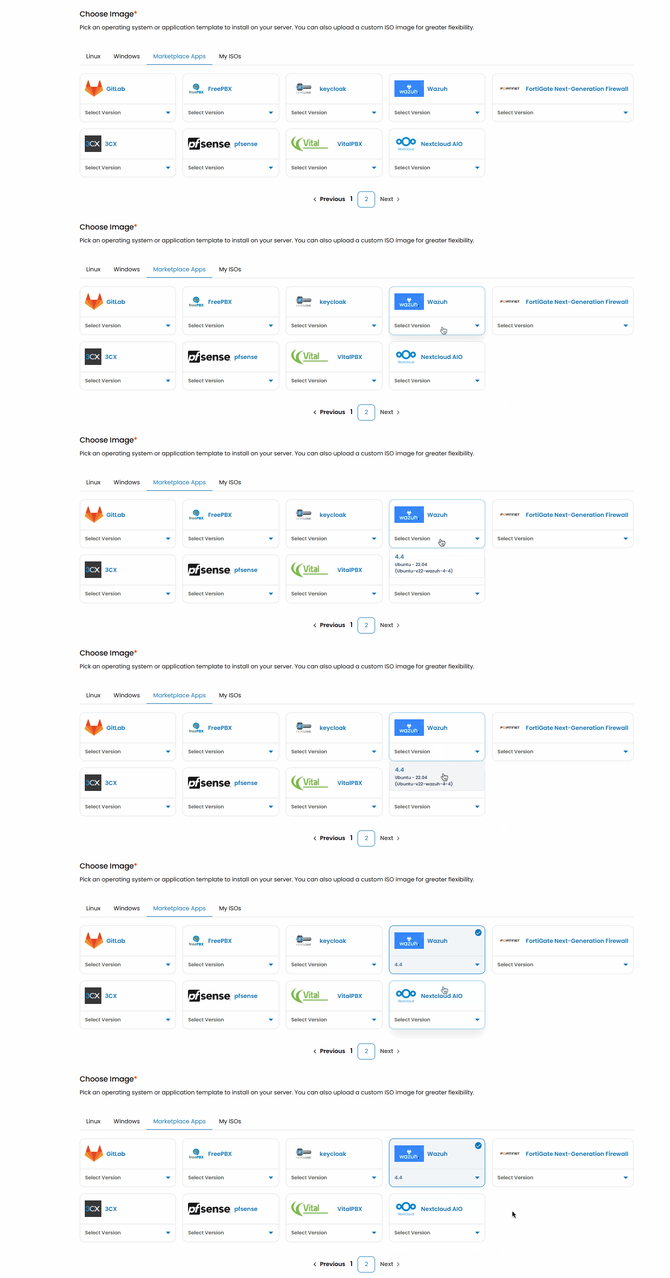
Accessing the Wazuh Dashboard
Once deployment is complete and a Public IP address has been assigned, you can access the Wazuh dashboard via your browser:
https://<public-ip>:443The default HTTPS port is 443. Wazuh agents use 1514 (TCP/UDP) to send data and 1515 (TCP) for initial registration.
Retrieving Your Password
To obtain your Wazuh dashboard credentials, run the following command on your instance:
tar -O -xvf wazuh-install-files.tar wazuh-install-files/wazuh-passwords.txtLocate and copy the password from the output.
Adding Agents
After accessing the platform, the next step is to add agents. Agents are the systems you want to monitor, such as servers, endpoints, or cloud instances.
- Navigate to the Agents section in the dashboard.
- Click Add Agent.
- Select the appropriate operating system.
- Copy and run the provided installation command on the target machine.
Once the installation is complete, the agent should appear as active in the dashboard.
More information can be found here